什么是Gruvbox
特点
gruvbox受badwolf, jellybeans和solarized的启发,采用柔和的“复古”颜色,Gruvbox的主要重点是保持色彩清晰易辨、对比度适中,同时兼顾视觉舒适度色调
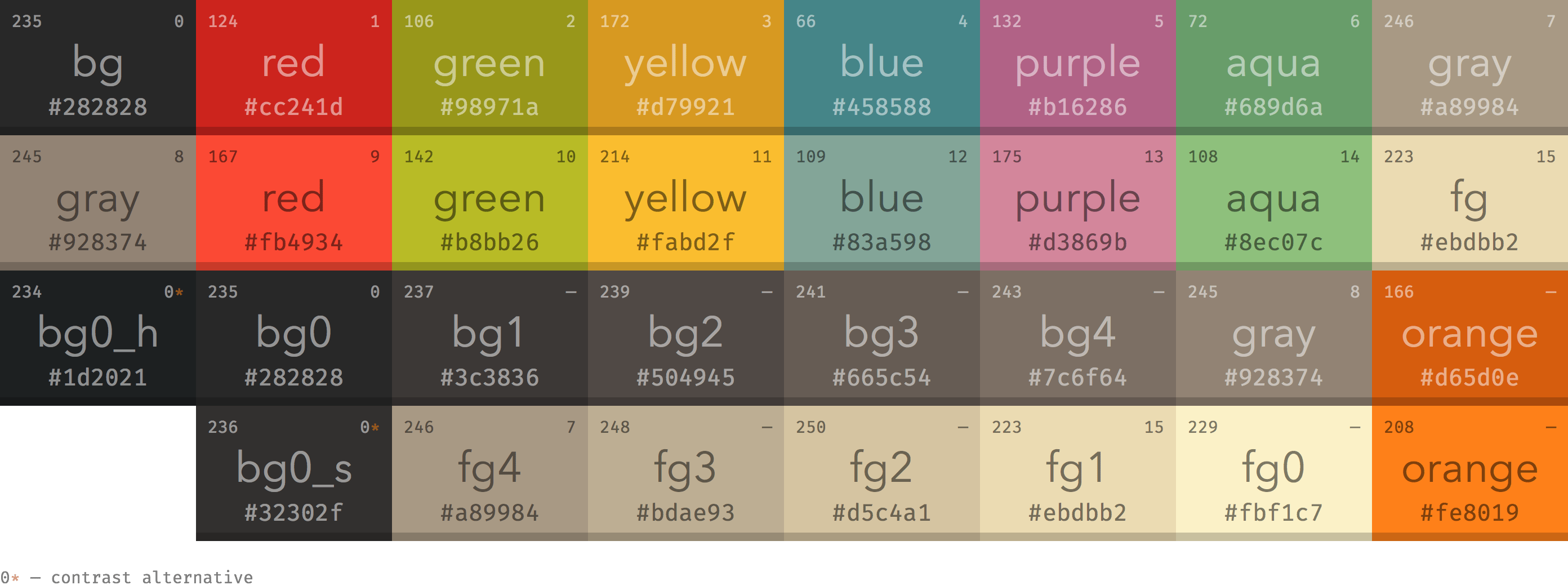
alacritty
alacritty可以克隆仓库,或下载您选择的主题:
1 | mkdir -p ~/.config/alacritty/themes |
添加一个导入alacritty.toml替换{theme}与你的理想色度处理:
1 | [general] |
或者你也可以在配置文件中添加:
点击查看脚本
1 | # Colors (Gruvbox dark) |
2.GTK主题
我们可以使用nwg-look来切换主题
sudo pacman -S nwg-look
仓库链接:
https://github.com/Fausto-Korpsvart/Gruvbox-GTK-Theme
如果你是archlinux,你也可以使用aur仓库
yay -S gruvbox-gtk-theme-git
3.Telegram
Telegram默认是没有gruvbox的配色方案的,所以我们可以使用配色文件来添加gruvbox配色
仓库地址:
https://github.com/y0av/telegram-gruvbox
4.qbittorrent
在默认的qbittorrent 是只有白色的,在晚上就十分刺眼,我们可以使用配色文件来效果
仓库地址:
https://github.com/MahdiMirzadeh/qbittorrent
5.图标主题
在默认的软件图标是软件的默认图标,十分不统一,所以可以借助图标主题来增加美观性
仓库地址:
https://github.com/SylEleuth/gruvbox-plus-icon-pack
6.鼠标主题
仓库地址:
https://www.gnome-look.org/p/2302110
7.fcitx5主题
仓库地址:
https://github.com/pu-007/fcitx5-gruvbox-dark-theme
或者使用aur
yay -S fcitx5-gruvbox-dark-theme-git
7.nvim主题
仓库地址:
https://github.com/ellisonleao/gruvbox.nvim
如果你是packer,在packer配置文件中添加
use { "ellisonleao/gruvbox.nvim" }
然后在nvim配置文件中启用
vim.cmd([[colorscheme gruvbox]])
8.emacs
仓库地址:
https://github.com/Greduan/emacs-theme-gruvbox
9.yazi
仓库地址:
https://github.com/bennyyip/gruvbox-dark.yazi
10.st
st只需要在配置中更改
1 | /* Terminal colors (16 first used in escape sequence) */ |